
Direct answer
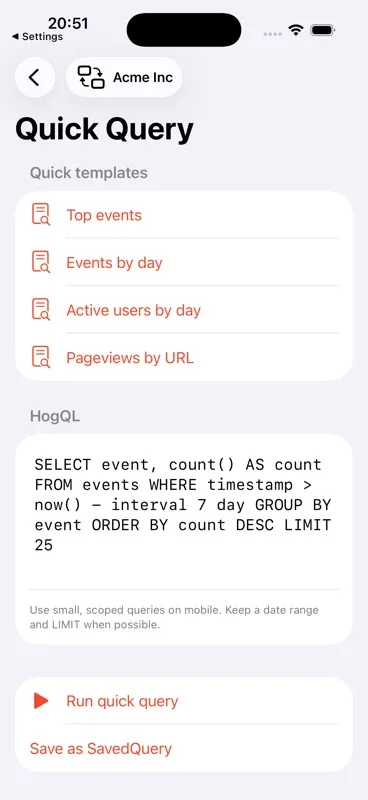
Open Quick Query, choose a template or write a small HogQL statement, keep it time-bounded with a LIMIT, and run it against the selected PostHog project. Results can be inspected as a table or raw JSON and used to create a local chart definition.
HogQL is PostHog's SQL interface. It is powerful enough to answer questions that do not fit a saved dashboard, but a phone is the wrong place for unbounded exploration. The safest mobile pattern is a short query with a clear date window, a narrow result shape, and an explicit row limit.
PostHog Pocket Dashboard sends the query to PostHog's project query endpoint with bearer authentication. It can cache the returned result locally when response caching is enabled, but it does not run a database or copy the API key into SQLite.
Before you start
- A selected PostHog project and a personal API key with project query read permission.
- A clear question that can be answered from PostHog data.
- Familiarity with the event or property names used by the project.
- A date window small enough for an intentional mobile check.
Step-by-step instructions
Open Quick Query
Choose a built-in starting point such as Top events, Events by day, Active users by day, or Pageviews by URL. Templates make the expected result columns obvious before you run anything.
Keep the query scoped
Add a timestamp condition and a LIMIT. Avoid SELECT * for large windows; return only the fields you will actually inspect on the phone.
Run against the selected project
Tap Run quick query. The app posts a HogQLQuery payload to the current project's query endpoint and keeps authorization in the request header.
Inspect the table before the raw JSON
Use Table for a compact row-and-column view. Open Raw JSON when you need to diagnose returned shapes, missing aliases, or a field the table transformer did not recognize.
Save only useful results
Save the query locally if you expect to run it again. Create a chart from the result when the returned columns describe a sensible x/y relationship; auto-detection is a starting point, not proof that the visualization is meaningful.
A safe mobile query example
Ask for daily event volume
This returns one row per day for the last 14 days, which is compact enough to inspect and chart on a phone.
SELECT toDate(timestamp) AS day, count() AS events
FROM events
WHERE timestamp > now() - interval 14 day
GROUP BY day
ORDER BY day
LIMIT 14Verify aliases
Clear aliases such as day and events help the result table and chart suggestion understand the intended axes.
Compare with the saved question
When a number matters operationally, save the query and its purpose—not just a chart—so a later result still has context.
Options and limitations
- The app is designed for small, scoped queries, not long-running exploratory analysis.
- The result cache can be disabled and expires according to the locally configured cache duration.
- Chart field suggestions are heuristic and should be reviewed before treating the visualization as correct.
- HogQL and API response behavior can evolve in PostHog; validate important queries in the web SQL editor when results are surprising.
Common mistakes
Leaving out a date range
A query over the entire events table can be slow and expensive. Add a timestamp boundary before running it from mobile.
Forgetting LIMIT
A phone table is not a data export surface. Return the smallest result set that answers the question.
Counting the wrong identity
Decide whether the question is about events, distinct_id, or person_id before comparing the result to another metric.
Troubleshooting
The query is forbidden
Confirm that the personal API key has the project query read permission and that the correct project is selected.
The result has no useful columns
Add explicit aliases and return scalar fields. Open Raw JSON to see the exact response before changing the query.
The chart looks wrong
Inspect the table, confirm the x and y columns, and remember that a generated local chart definition does not validate the meaning of the aggregation.
Related questions
Does HogQL run on the iPhone?
The editor is on the iPhone, but PostHog executes the query on the selected PostHog host through its query API.
Can I save a query result offline?
When response caching is enabled, results can be cached in the app's local SQLite database. The API key is stored separately in Keychain.
Primary references
Product behavior above is based on the app source. These official PostHog references cover the underlying PostHog capability: